01 / CAPTURE
Capture
Every guest. In the frame.
- Live preview
- Countdown
- Capture
- Retake

EAZYBOOTH / PHOTO BOOTH SOFTWARE
Professional capture, print and photo booth software designed for the realities of live events.
01THE IDEA
Your camera. Your brand. Your event.
Brought together in one considered workflow.
The scene, in focus.
Every frame, yours.
Set once. Make it yours.
A moment to take away.
02THE WORKFLOW
From the first setup
to the last print.
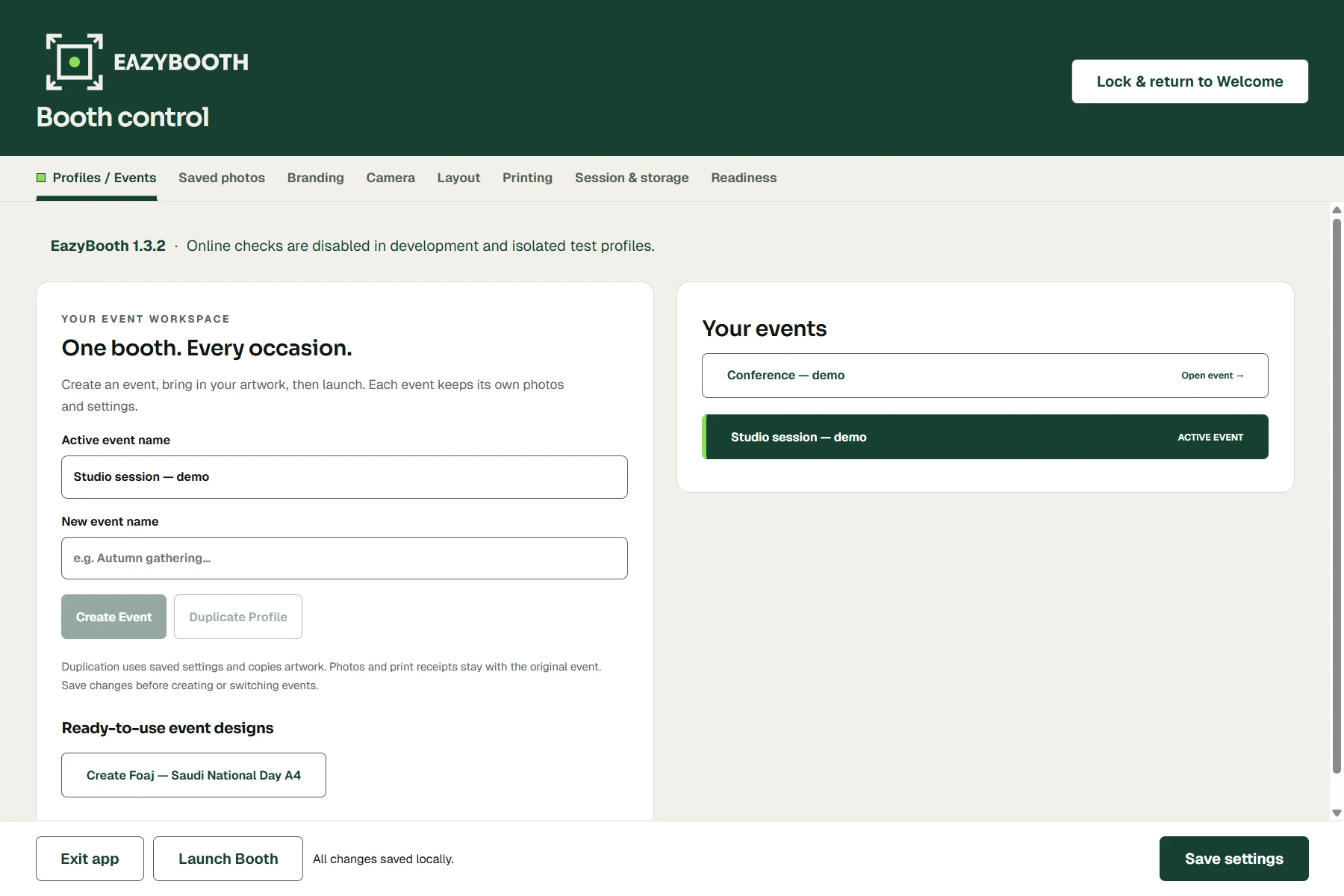
Branding, layouts, guest frames and event settings live inside a reusable event profile.
Select the camera and printer being used for the event.
Move from welcome screen to live preview, capture, review and print.
Review saved photos, reprint when needed and manage the booth without rebuilding the experience.
03BUILT FOR REAL EVENTS
Clear controls. Saved outputs.
A workflow that keeps its place.
Print accepted means Windows accepted the job. Physical output is confirmed at the printer.
04CORE CAPABILITIES
Everything has a place.
Everything works toward the moment.
Every guest. In the frame.
Your event, throughout.
From a moment to a keepsake.
Ready for the next guest.
05LOCAL BY DESIGN
EazyBooth’s core event workflow runs locally, so capture and printing do not depend on a constant cloud connection.
Inside the local workflowCore workflow illustration. Device setup and on-site checks still apply.
06HARDWARE COMPATIBILITY
Choose the equipment.
Confirm the setup.
Make the test print.
Select the exact installed video device. Delivered resolution and focus depend on your camera and driver.
A guided Windows webcam workflow, with visual scene confirmation before guest capture. Check Sony’s model compatibility.
Native Windows photo printing with a saved driver preset. Configure the exact queue, media and orientation on each laptop.
Windows queue setup with 4×6 and SELPHY postcard presets. Match the driver, paper and ribbon to your exact model.
A locally installed desktop application. Camera and printer drivers are installed separately for your event hardware.
Compatibility depends on the exact device, driver, Windows version and media. Setup documentation is not a certification of every hardware combination. Confirm camera, print quality and sustained operation on site.
07THE PRODUCT INTERFACE
A dedicated home for each event. Keep settings and artwork together, then reuse your setup.
Actual application interface. Demonstration event; simulated devices and sample images.
Open full-size screenshotEAZYBOOTH / CAPTURE NODE / 001
Converge. Capture. Resolve.
THE FIELD NOTES
08A PLAN FOR YOUR SETUP
Two professional plans, each with two active devices.
Custom agency solutions for larger fleets.
PRICING ANNOUNCED7-day trial planned · No permanent free plan · Checkout coming soon.
Professional photo booth software without a yearly commitment.
PLAN INCLUDES / ROADMAP
Run events year-round and save $151 compared with monthly billing.
PLAN INCLUDES / ROADMAP
For agencies and operators managing more than two Windows photo booths.
PLAN INCLUDES / ROADMAP
Prices are announced in USD. Checkout, trial activation and license delivery are not live yet. Taxes, billing and final service terms will be displayed before purchase.
09YOUR NEXT EVENT
Bring EazyBooth into your next activation, conference or live event.
Download, contact and licensing details are being finalized.
Availability will be announced here.